
DuoxMe integration with Google Home (Google Assistant)
DuoxMe integration with Google Home (Google Assistant)
What does this integration offer?
DuoxMe is fully integrated with the Google Home ecosystem, allowing you to:
-
Receive call notifications on your Google speakers or displays.
-
Open the door with voice commands such as:
“Ok Google, open the previous configuration has been established. Support Center
📱 Steps to configure DuoxMe with Google Assistant
-
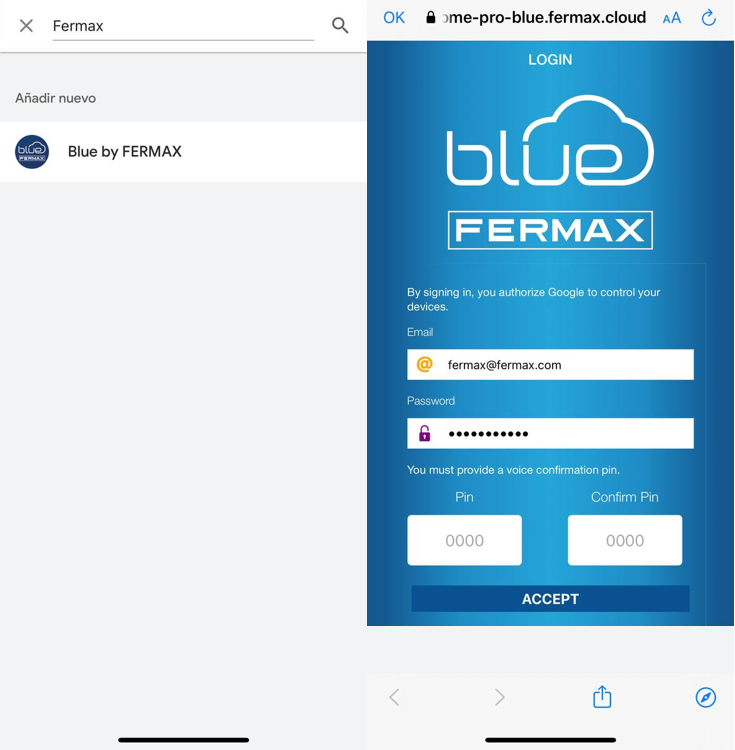
Open the Google Home app and select “Add device” → “Works with Google” .
-
Search and link Fermax DuoxMe .
-
After pairing, enter the 4-digit confirmation code that Google will ask for (this increases security when opening your door by voice). Support Center
Paired devices per home:
-
One or more doorbells (depending on the number of portals you have configured)
-
An F1 device from a kit, such as this FERMAX 9411 kit
The name you'll use for voice commands is the same one you set up in DuoxMe. Support Center
🚪 How to open the door using Google Assistant
Use this pattern: “Ok Google, open [name]” or “…unlock [name]” , for example:
“Ok Google, open Portal”
“Ok Google, unlock Home”
Google will require the 4-digit voice key you set up during pairing. Support Center
🔔 Receive call alerts on your speakers
Enable Voice Notifications for your doorbell (e.g., "My Home Portal"), and they'll play on your speaker when someone calls through your video intercom. Support Center